Import Base Settings for SMART SAF-T for Ukraine
The system includes a tool called Import predefined SMART packages, which allows you to quickly and conveniently import the core settings required to generate the file. These settings include reference data such as document types, tax types, stock movement types, standard account categories and standard accounts, audit file export setup, export format, account mappings, source codes, and more.
To use the import tool, follow these steps:
-
Click the Search button to open the Search function, and enter Import predefined SMART packages. Then go to the corresponding link.
-
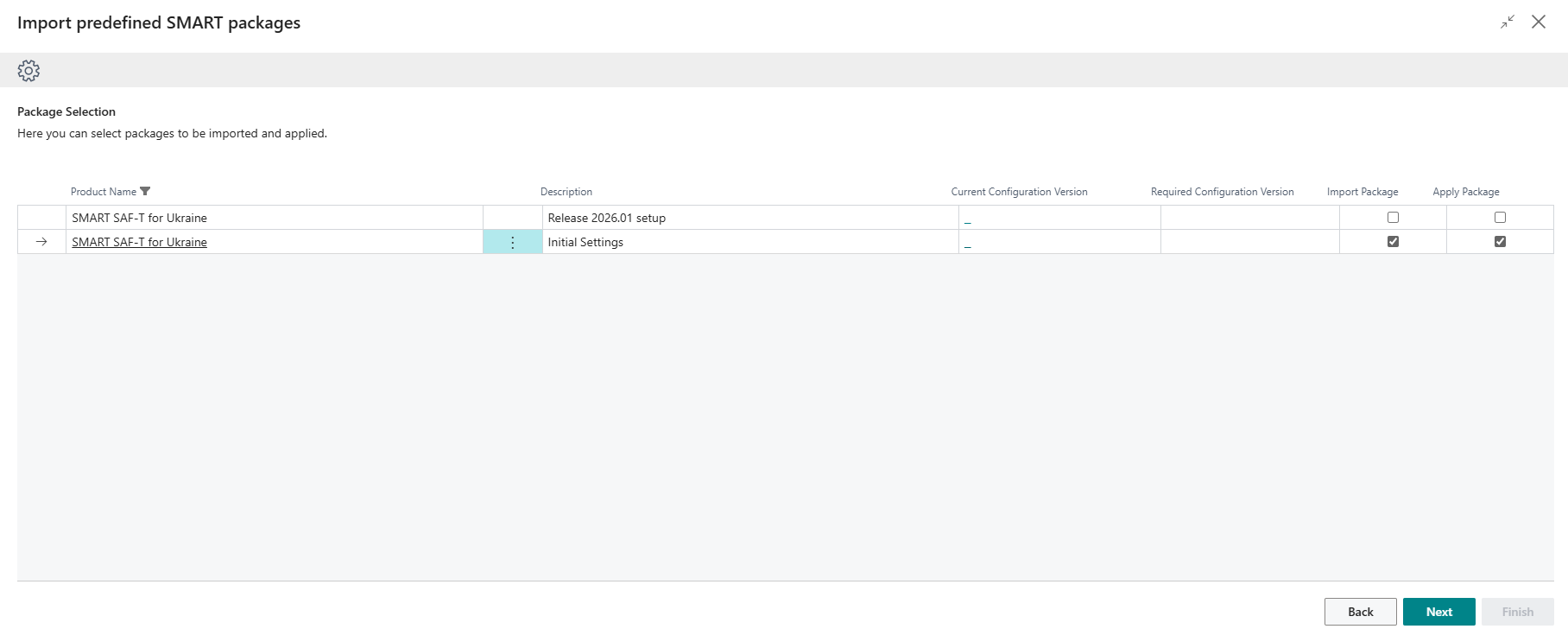
On the Import predefined SMART packages page, select SMART SAF-T for Ukraine — Initial Settings, check the Import Package field and, if needed, Apply Package so the system immediately applies the data, then click Next.
-
The Configuration Packages page will load a package with the code SAFTUA.SETUP.DATA. If the Apply Package option was not selected in the previous step, go to the Configuration Packages page and click Apply Package to apply all table data from the package.
This tool can also be used to load updated settings when a new version of the product is released.