Operations with Low-Value FAs
Purchasing Low-Value FAs
The process of purchasing Low-Value FAs generally does not differ from the standard process, with a few exceptions:
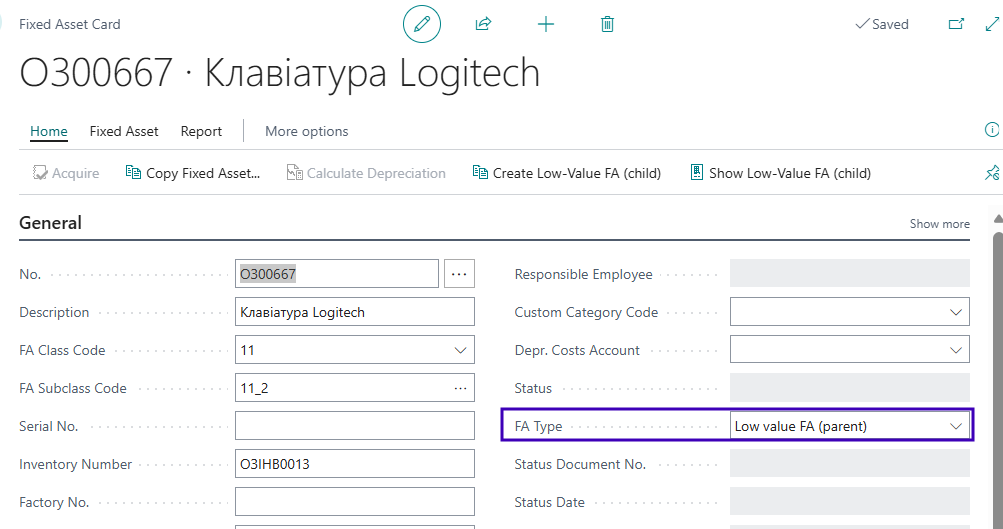
- Before processing the purchase of a group of Low-Value FAs, you need to create a Fixed Asset Card with the Low value FA (parent) type.
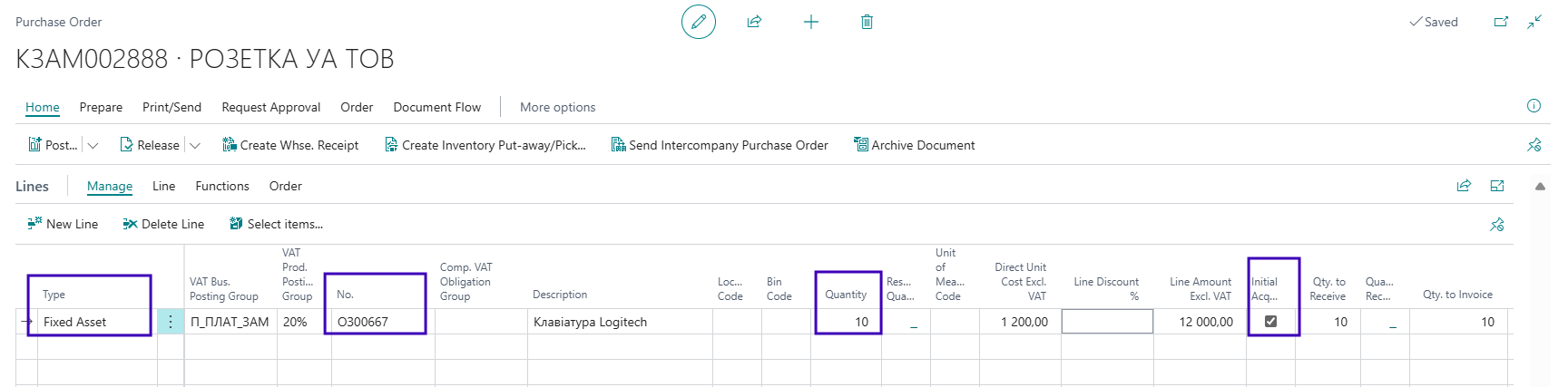
- In the purchase order/invoice line, select the number of the previously created FA card with the Low value FA (parent) type and specify the total quantity of units in this Low-Value FA group.
During the next purchase of Low-Value FAs, in the document line you need to set the Initial Acquisition flag. Then the purchased quantity will be added to the Low value FA (parent) card. If the flag is not set, the system will treat the purchase as additional costs: it will increase the value but not the quantity.
Purchase Return to Vendor
The functionality supports both partial and full return of the purchased Low-Value FA batch quantity that was allocated to the Low value FA (parent). The only condition is that no Low-value FA (child) records should have been created for the quantity being returned. The return follows the standard process for fixed assets.
Release
The release of a Low-value FA (child) follows the standard process but with certain differences, namely:
- in the document line, specify the Low value FA (parent) number and indicate the quantity of Low-value FA (child) records to be released;
- when filling in the quantity, the system will automatically select (using the FIFO method) Low-value FA (child) records with the Inventory status that match the specified Depreciation Book Code in the FA Release Act line.
To view the list of Low-value FA (child) records, use the Select Low-value FA (child) function, which will open the Low-value FA (child) list.
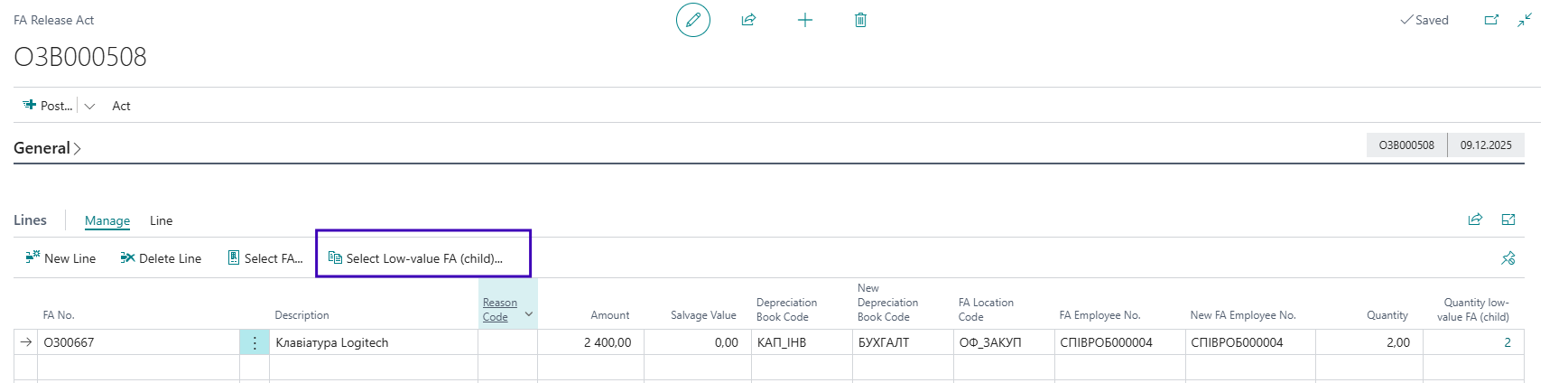
To make changes to the list, select the Get low-value FA (child) function, which will open a page with the list of available Low-value FA (child) records for selection.

Note If it is necessary to release a group of Low-Value FAs in parts to different FA Location Codes or Responsible Employees, separate acts must be created for each unique combination (FA Location Code + Responsible Employee).
Reversal of Posted FA Release Act
If you need to cancel the release of one or more Low-value FA (child) records, follow these steps:
- Go to the FA Ledger Entries page and find the release operations related to the required Low-value FA (child).
- Select the operation for each depreciation book separately and use the Cancel Entries function.
Important: the release operation must be the last operation for this Low-value FA.
- After reversal, the system will automatically create lines in the Fixed Asset G/L Journals.
- Go to the Fixed Asset G/L Journals, change the FA status to Inventory and post the lines.
Movement
The FA Movement Act is created using the same principle as the FA Release Act. The system will allow selecting a Low value FA (parent) when it has Low-value FA (child) records at the location and with the Responsible Employee specified in the act header, as well as matching the data specified in the document line (Status and Depreciation Book Code).
You can view the list of Low-value FA (child) records using the Select Low-value FA (child) function.
The Low-value FA (child) records on the Low-value FA (child) page will be moved by this act; to adjust the list, use the Get low-value FA (child) function.
There is also a capability to move the Low value FA (parent) card along with all the Low-value FA (child) quantity that has not yet been distributed at the time of creating the movement, meaning those for which individual Low-value FA (child) cards have not been created.
To move the Low value FA (parent) and the undistributed Low-value FA (child) quantity on it, activate the Movement FA Parent flag in the FA Movement Act line.
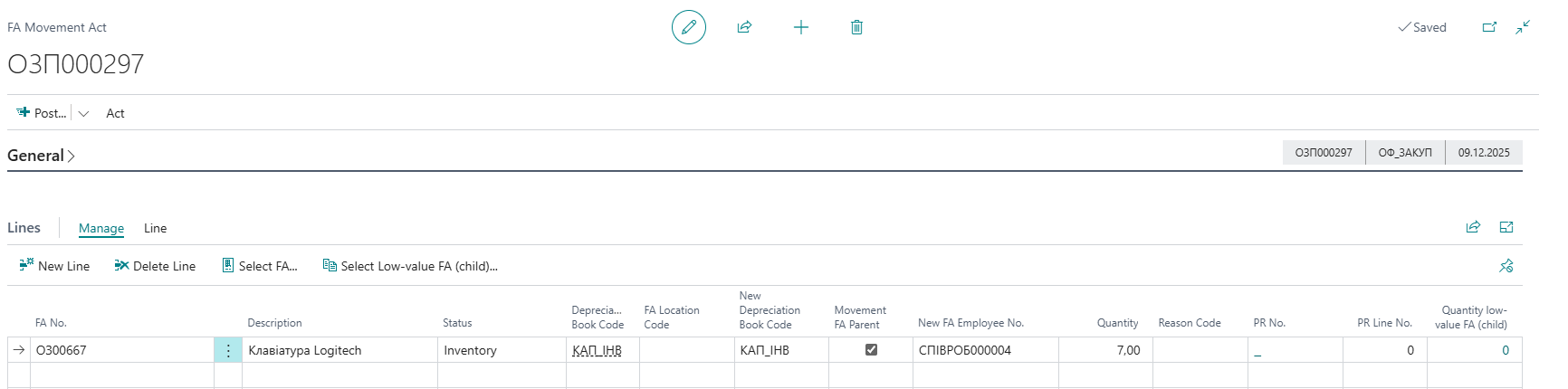
If the flag is not activated, the movement will only apply to already distributed Low-value FA (child) records.
Cancel posted Fixed Asset Movement Act
To cancel the posted data of the Fixed Asset Movement Act, if the lines of the movement act did not include a movement to another depreciation book code, and/or the current movement act is the last operation for Low-value FA, perform the following actions:
- Open the Posted FA Movement Act.
- Select the document lines that need to be canceled.
- Go to the Lines tab and click the Cancel FA Location Movement.
The system will automatically set the Canceled flag for the corresponding act line and restore the previous values of the Responsible Employee and FA Location Code fields in the Low-value FA card.
Transfer of Item to Fixed Asset
The system supports transferring items to fixed assets with the Low value FA (parent) type, but with a restriction: different item codes cannot be specified for the same Low value FA (parent) in a single act. That is, each item code can only be linked to one FA. If items from several batches with different unit costs are transferred to a single Low value FA (parent), the unit cost of the Low-value FA (child) is calculated as the average of those costs.
Write-Off
The FA Write-off Act is created using the same principle as other acts — in the line, the Low value FA (parent) is specified (the system will allow selecting it only when this Low value FA (parent) has Low-value FA (child) records that match the filter in the act header fields FA Location Code and Responsible Employee).
In the Select Low-value FA (child) function on lines, all FA (child) records selected by the system based on the filters in the act header will be displayed.
After posting the write-off act, information about the status change to Written-off can be seen both on the Low-value FA (multiquantity) page and on each of the Low-value FA (child) cards that were written off.
Inventory
Lines for the FA Inventory Act are created according to the following principle:
- in the act line, the FA (parent) is specified;
- there may be several lines for one FA (parent), depending on the unique combination of Depreciation Book Code - FA Location Code - Responsible Employee for its FA (child) records, limited by the filters in the act header;
- for each line, the quantity and value are calculated for the FA (child) records that match the Depreciation Book Code - FA Location Code - Responsible Employee combination specified on the line.
Accounting for Other Operations with Low-Value FAs
The accounting process for other document types (such as Transfer for Modernization, Modernization, or Reclassification for Sale) is performed in the same way as in the examples above.
The general rule is as follows: in the FA document line, select the Low value FA (parent), specify the required quantity in the Quantity field, and if necessary, adjust the list of Low-value FA (child) records using the Select Low-value FA (child) function.
Depreciation for FAs with the Low-value FA (child) type is calculated automatically when posting the FA Release Act. The depreciation start date is the date of the release operation.
Useful Links
FA Acquisition
FA Return to Vendor
FA Release Act
FA Internal Movement
FA Repair and Modernization
Transfer of Item to Fixed Asset
FA Depreciation Calculation
FA Write-Off
FA Disposal
FA Inventory