Data Retention Policies
The application functionality supports automatic cleanup of YouControl integration logs using data retention policies.
This mechanism allows you to control the duration of data storage for log tables and maintain an optimal database size.
Purpose of Data Retention Policy Functionality
Data retention policies are designed to automatically delete obsolete records from log tables after a defined retention period expires. This allows you to:
- prevent the accumulation of excessive system data;
- ensure that only up-to-date information is stored in logs;
- maintain stable performance and an optimal database size.
Configuring a Data Retention Policy
Before using the data retention policy functionality, you must configure all log tables related to YouControl.
Select the page search icon in the upper-right corner /icons/search_small.png, which opens the Search function.
Enter “Retention Policies” in the search field and follow the corresponding link.
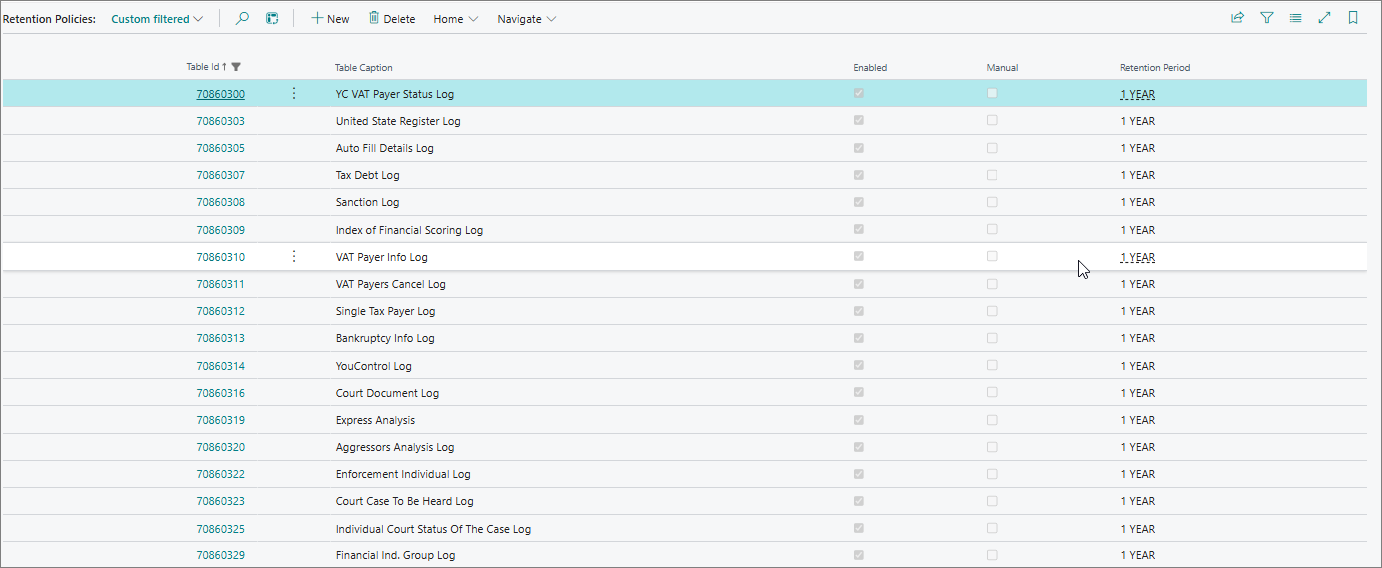
On the Retention Policies page, a list of available tables for which data retention policies can be configured will be displayed.
For correct operation of the functionality, specify appropriate values for the following fields:
| Field | Description |
|---|---|
| Table ID | Specifies the ID of the table to which the retention policy is applied. |
| Enabled | Specifies whether the retention policy is enabled (active/inactive status). |
| Manual | Specifies whether the retention policy can be run only manually. |
| Retention Period | Specifies the identifier of the record retention period (for example, 1 YEAR). |
For example, in the test company, all retention policies related to YouControl logs were configured with the value Retention Period = 1 YEAR and set to active status.
Data Cleanup Logic
Log cleanup can be performed automatically using a recurring system job.
Checking the Cleanup Job (One-Time)
- Select the page search icon in the upper-right corner /icons/search_small.png to open the Search function.
- In the search field, enter “Job Queue Entries” and follow the corresponding link.
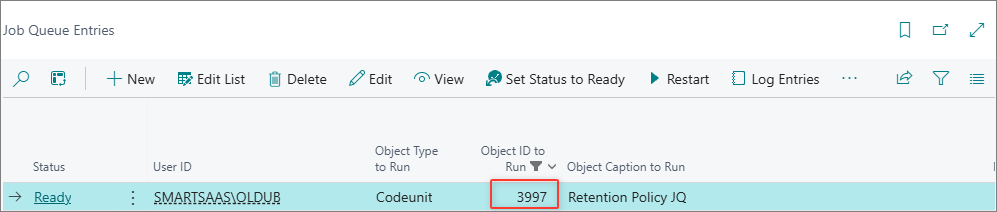
- On the Job Queue Entries page, filter records by the Object ID to Run field with the value Codeunit 3997 (object Retention Policy JQ) and make sure that the corresponding job exists in the system.
- If such a job is missing, it must be created manually.
Running Data Cleanup
Once the job is configured, data cleanup can be performed in one of the following ways:
-
Via the Job Queue Entries page
Go to the Job Queue Entries page, select the Retention Policy JQ job, and click Run once (foreground). -
Via the Retention Policies page
Go to the Retention Policies page and use one of the following actions:
- Home → Apply All — to apply all active policies;
- Home → Apply Manually — to apply policies that have the Manual status set.

After the cleanup is started, the system:
- analyzes all active data retention policies;
- identifies records whose retention period exceeds the allowed limit (for example, older than 01/01/2005);
- automatically deletes such records from the YouControl Log log and from other log tables covered by the corresponding policy.