Setting up VAT Business Posting Groups to check the status of counterparties
Setting up VAT Business Posting Groups to check the status of counterparties
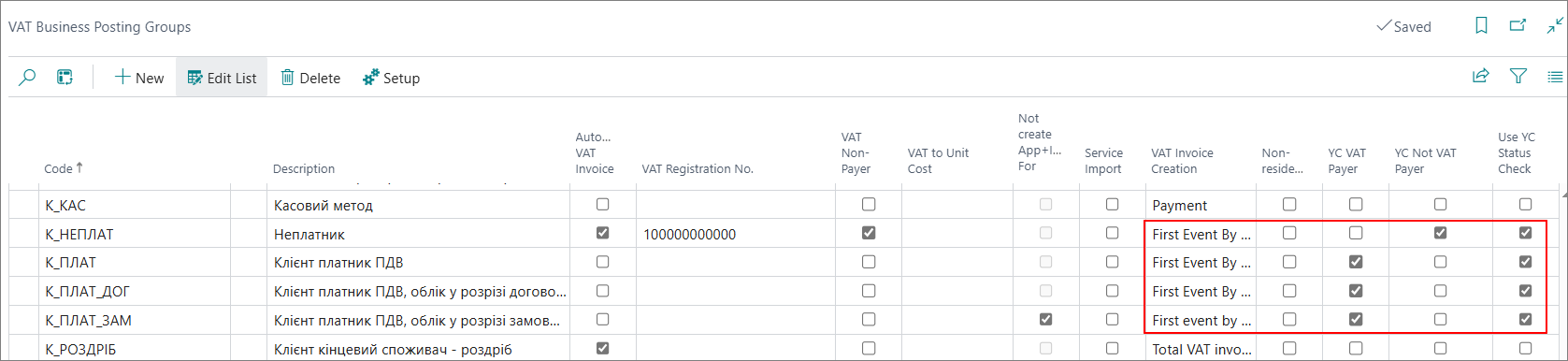
Select the page search in the top right corner  , which will open the Search function. In the search box, type VAT Business Posting Groups and follow the appropriate link. The VAT Business Posting Groups page that opens displays a list of VAT-available business groups. For the application to work correctly, select the appropriate field values, according to the VAT of the business group.
| Field | Description |
|---|---|
| YC VAT Payer | Indicate whether the current VAT business group has the VAT Payer status according to YouControl. |
| YC Not VAT Payer | Indicate whether the current VAT of the business group has the Non-VAT payer status according to YouControl. |
| Use YC Status Check | Indicate whether the taxpayer status for the current VAT of the business group will be checked in Business Central with YouControl data. |