Import predefined SMART packages
There is a Import predefined SMART packages tool in the system that allows you to quickly and conveniently import the master data and settings required to start working. These data and settings include a standard chart of accounts, posting groups, basic module settings, postal code directories, country/region lists, currencies, and so on.
To use the import tool, perform the following steps:
-
Click the Search button, which opens the Search function, and enter Import predefined SMART packages, then go to the corresponding link.
-
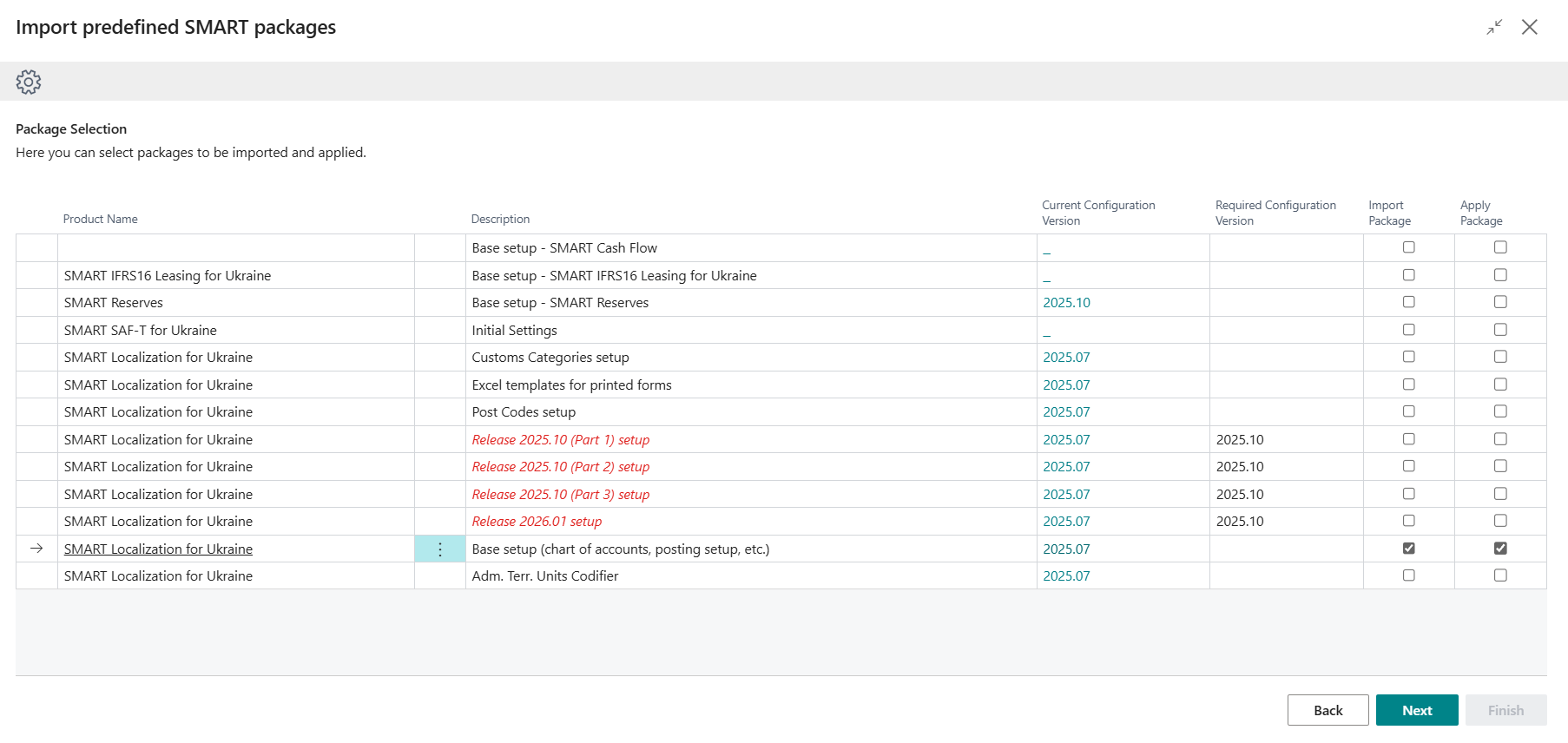
On the Import predefined SMART packages page, select the settings that need to be loaded and set the checkboxes Import Package and Apply Package, if required, so that the system applies the data immediately, and then click Next.
-
A package with the code UA.SETUP.DATA will be loaded on the Configuration Packages page. If Apply Package was not selected in the previous step, you need to go to the Configuration Packages page and click Apply Package to apply all table data from the package.
Using this tool, you can also download Excel templates of printed forms for the Ukrainian localization and settings when a new product update is released. In addition, the Import predefined SMART packages tool checks whether the current configuration version matches the new product version. If the SMART product has been updated and the configuration version does not match the new version, the system automatically displays a notification in the Role Center, and product packages whose configurations require updating are highlighted in red on the Import predefined SMART packages page.