Low-Value FA Card
Before starting to work with Low-Value FAs, as with other fixed assets, you need to create a Fixed Asset Card with the Low value FA (parent) type.
Creating Cards with the Low-value FA (child) Type
After purchasing a specified quantity of Low-Value FAs and reflecting them on the FA card with the Low value FA (parent) type, before release it is necessary to create the required number of Low-value FA (child) cards and calculate their initial cost.
For this purpose, there is a separate function Create Low-Value FA (child), available both on the Low-value FA (multiquantity) page and on the FA card with the Low value FA (parent) type.
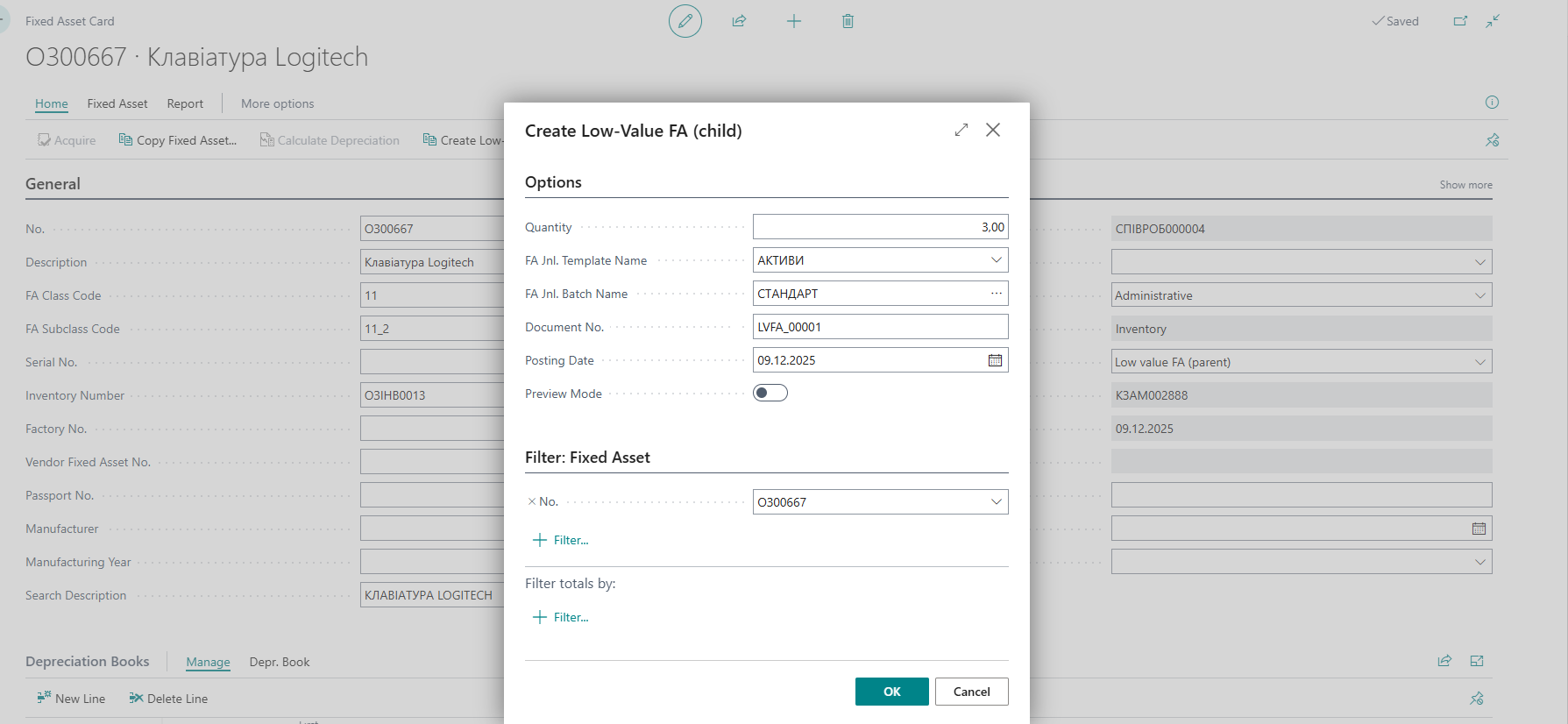
When running this function, you can specify:
- the number of Low-value FA (child) cards to create; if the field is left blank, the system will automatically create cards for the entire available quantity specified on the Low value FA (parent) card at the time of creating the Low-value FA (child) records;
- the posting date for the cost distribution from the Low value FA (parent);
- the document number that will be used for the cost distribution;
- the journal template and batch through which the distribution will be posted;
- to preview the entries, activate the corresponding option on the page.
The system also allows creating Low-value FA (child) cards for multiple Low value FA (parent) records simultaneously. To do this, on the Low-value FA (multiquantity) page or Fixed Assets list, select the required Low value FA (parent) records and use the Create Low-Value FA (child) function. If a quantity is specified in the Create Low-Value FA (child) request page, the system will generate the specified number of Low-value FA (child) cards for each selected Low value FA (parent).
When creating Low-value FA (child) cards, the system distributes the cost that was accumulated on the Low value FA (parent) as of the posting date specified when running the Create Low-Value FA (child) function. The distribution is calculated using the average cost method. In cases where the cost cannot be evenly distributed across all units, one of the (child) cards may receive a slightly higher/lower amount due to rounding.
Note Since the distribution is performed as a single document, its reversal, if needed, is done by pressing Reverse Transaction in the FA Ledger Entries. In this case, the cost distribution is reversed for all Low-value FA (child) records that participated in the distribution, not just for the individual Low-value FA (child) on which the function was triggered. Before reversal, make sure that no other operations occurred after the cost distribution (or that they have all been canceled). In that case, the system will allow you to select and delete the unnecessary Low-value FA (child) cards after the distribution reversal.